Day 9 Task: Deep Dive in Git & GitHub for DevOps Engineers.
What is Git?
Git is a version control system used for tracking changes in computer files. It is generally used for source code management in software development.
Git is used to tracking changes in the source code
The distributed version control tool is used for source code management
It allows multiple developers to work together
It supports non-linear development through its thousands of parallel branches
Here are some reasons why Git is important:
Collaboration: Git allows multiple developers to work on the same codebase simultaneously and collaborate on changes. This helps to speed up development and improves overall efficiency.
Version Control: Git enables version control, which means that developers can keep track of changes made to the codebase over time. This makes it easy to revert to an earlier version if something goes wrong or to compare different versions of the code.
Branching and Merging: Git allows developers to create different branches of the codebase and work on different features or fixes simultaneously. This makes it easy to isolate changes and test them independently before merging them back into the main codebase.
Backup and Recovery: Git repositories serve as a backup of the codebase and can be used to recover lost or deleted files. This is particularly important for critical projects where losing code could result in significant downtime or financial losses.
Open Source: Git is an open-source project, which means that it is free to use and can be modified by anyone.
What is difference Between Main Branch and Master Branch??
They are conceptually the same thing. The convention just changed: previously the primary branch was called
masterand for newer repository that defaults tomain. You should only ever have one of those in a single repository (nothing breaks if you have both, but it's unlikely to be intentional).Can you explain the difference between Git and GitHub?
GIT
GITHUB
Git is a software.
GitHub is a service.
Git is a command-line tool
GitHub is a graphical user interface
Git is installed locally on the system
GitHub is hosted on the web
Git is maintained by Linux.
GitHub is maintained by Microsoft.
Git is focused on version control and code sharing.
GitHub is focused on centralized source code hosting.
Git is a version control system to manage source code history.
GitHub is a hosting service for Git repositories.
Git was first released in 2005.
GitHub was launched in 2008.
Git is open-source licensed.
GitHub includes a free tier and a pay-for-use tier.
Git has minimal external tool configuration.
GitHub has an active marketplace for tool integration.
Git provides a Desktop interface named Git Gui.
GitHub provides a Desktop interface named GitHub Desktop.
How do you create a new repository on GitHub?
In the upper-right corner of any page, use the drop-down menu, and select New repository.

Type a short, memorable name for your repository. For example, "hello-world".

Optionally, add a description of your repository. For example, "My first repository on GitHub."
Choose a repository visibility. For more information, see "About repositories."
Select Initialize this repository with a README.
Click Create repository
Q. What is difference between local & remote repository? How to connect local to remote?
A local repository is a copy of a Git repository that is stored on your local computer, while a remote repository is a copy of the same repository that is hosted on a remote server, such as GitHub
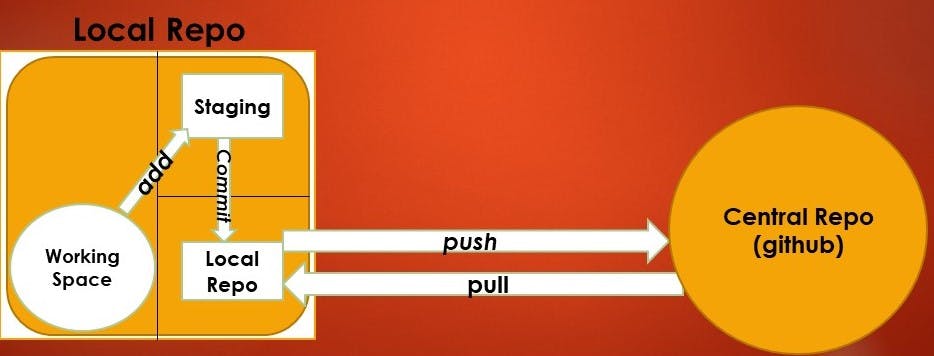
To connect a local repository to a remote repository, you can follow these steps:
Create a new repository on your remote server e.g. GitHub.
In your local repository, open a terminal or command prompt and navigate to the root of your project.
Run the following command to add the remote repository URL to your local repository:
git remote add origin <remote repository URL>Replace
<remote repository URL>with the URL of your remote repository.Push your local repository to the remote repository by running the following command:
git push -u origin master
Task 1:
- Set your user name and email address, which will be associated with your commits.
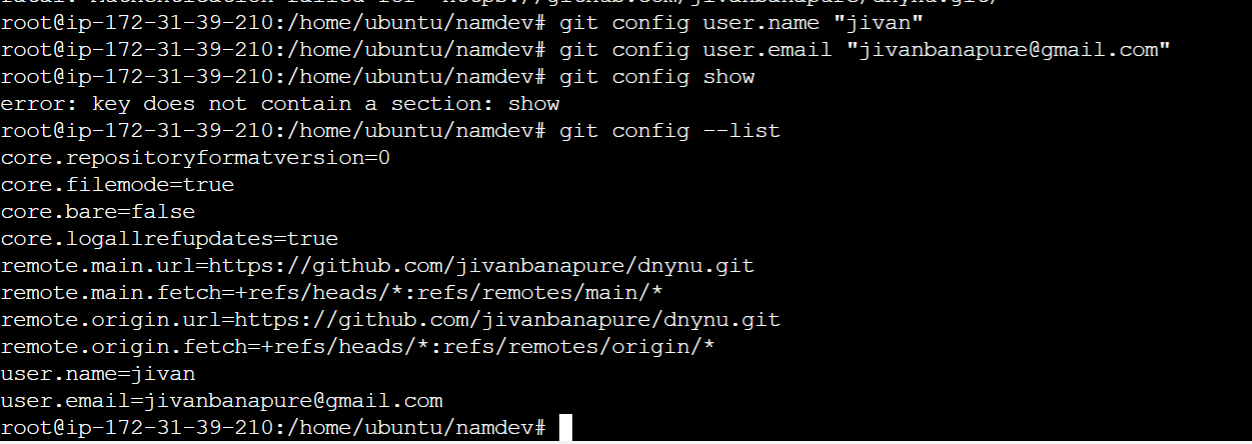
Task 2:
Create a repository named "Devops" on GitHub
Connect your local repository to the repository on GitHub.
To connect the local repo to central repo use below command.
#sudo git remote add origin <central git repo>
Create a new file in Devops/Git/Day-02.txt & add some content to it.
Create file name file.txt in local repo and after add, commit . Push the changes in central repo.
#touch file.txt
Push your local commits to the repository on GitHub
#git push -u origin main
Thank you !